Italics is the delightfully simple way to read and edit the files your AI writes.
ChatGPT keeps handing you messy “markdown” files. Italics lets you see and edit them like you would in Word.
Open the .md files from ChatGPT and Claude as clean, formatted documents. The # and ** symbols never show up.
Reading any file is free, forever. No account, no credit card. Windows.
You know this moment.
You ask ChatGPT for a project plan. Or a proposal. Or a checklist for the week. Ten seconds later, there it is: smart, thorough, better than you hoped.
You save the file. You double-click it. And you get… a wall of hashtags, asterisks, and pipes. Titles with # stuck to the front. Important words squeezed between **. A table drawn out of dashes, like furniture that arrived without the instructions.
So you cope. You paste it into Word and spend ten minutes fixing what the paste broke. You squint past the symbols and hope you don’t delete one that mattered. Or the file just sits in your Downloads folder, perfect and unreadable.
Those files aren’t going to stop coming. Italics exists so you never have to look inside one again.
This is a file straight from ChatGPT. This is all you see.
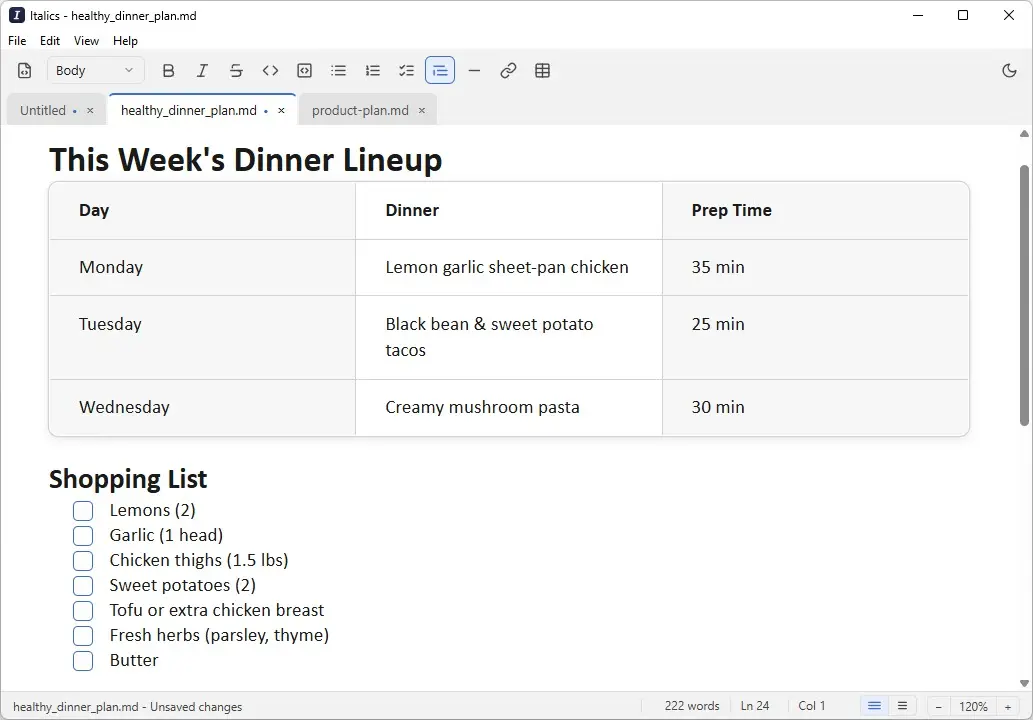
The same file every other app shows you as symbols, opened the way it was meant to look.
The same file. Two very different experiences.
On the left, what a plain text editor shows you. On the right, the exact same file in Italics. Not a copy, not a conversion.
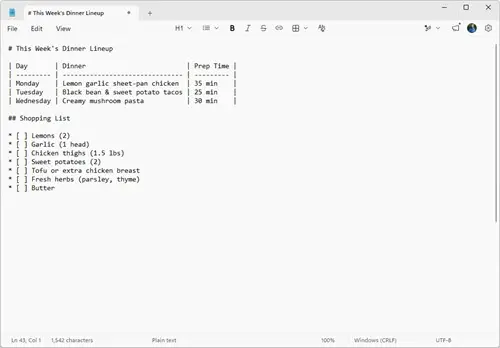
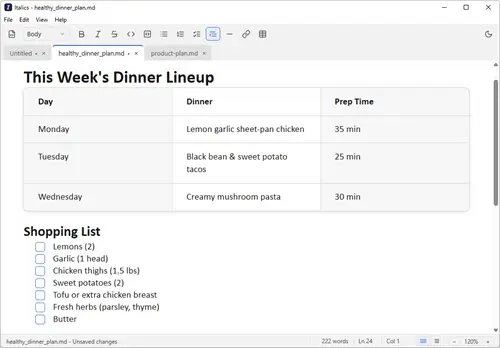
Click into the table and change a number. Tick a box. Bold a word with the toolbar. Save, and it’s still an ordinary file that ChatGPT, Claude, and everything else can open.
Other apps make you learn Markdown. Italics makes it disappear.
Five things change the moment you open a file in Italics.
You never see a single symbol.
Every other “Markdown editor” still shows you the raw code and expects you to know it.
Italics shows formatted text and one simple toolbar, the kind you’ve used in Word a thousand times. The #, the **, the backticks: they stay hidden, always.
Markdown stops feeling like something technical. It just looks like a document.
Project kickoff
Thanks, everyone. Here’s what we agreed on today, in plain words.
- Ship the beta by Friday
- Book the demo call
Open it. Read it. Change a word. Save. Done.
You didn’t want a new workflow. You wanted to read the file and maybe fix a line.
Double-click a file in your folders, or drag it onto the window. It opens as a document you can edit right away. Save, and you’re done. No modes to switch, no preview to toggle.
The whole thing takes seconds, and works exactly the way you’d expect.
Q3 planning notes
Double-click a file in your folder, or just drag it onto the window. It opens as a document you can edit right away.
- Draft the roadmap
- Share with the team
No split screen. No decoding. No toggling.
Most tools built for these files put raw code on one side and a preview on the other, and leave the reading to you.
Italics has no preview pane, because there’s nothing to preview against. What you see is the document. That’s the whole screen.
You spend your time reading and editing, not translating symbols in your head.
Q3 Marketing Brief
One clean view fills the window. There’s no preview pane and nothing to toggle. What you see is the document.
- Finalize the launch date
- Approve the headline
- Send to the mailing list
Your files stay ordinary files.
Plenty of apps import your document into their world and hand it back in their format.
Italics doesn’t. It saves a plain file that ChatGPT, Claude, Notepad, and every other app can still open perfectly. No account to sign into. No special format. Nothing to trap your work.
You own your files today, and you’ll still own them if you ever stop using Italics.
Still opens perfectly in…
It does one job, and it won’t lose your work.
You don’t need a note-taking empire with plugins and vaults to read a file your AI wrote.
Italics is a document editor, and only that. It writes a backup before it saves over anything, and it keeps recovery snapshots, so a crash or a mistake doesn’t cost you your words. Everything stays on your computer.
A small, quiet app that opens fast and stays out of your way.
Weeknight Dinner Plan
Keep several files open at once. Italics writes a backup before every save and keeps crash-recovery snapshots, so your work is never at risk.
- Buy the groceries
Reading is free, forever. No account, no card.
Where people open Italics.
The plan ChatGPT just wrote you
Open it, read it like a real document, tweak the parts that don’t fit, and save. No symbols in sight.
The README a developer sent
Someone shared a file full of #s and asterisks and said “it’s all in here.” Now you can actually read it.
Notes and specs shared with you
Meeting notes, a spec, a hand-off doc: the ones that arrive as .md and open as a mess everywhere else.
A document you want to keep portable
Write once, keep it as a plain file, and open it anywhere later. Nothing locks it to one app or account.
The answer is always YES.
The questions people ask before downloading tend to have the same short answer.
- Can I open the
.mdfiles ChatGPT and Claude give me? YES - Can I just double-click a file to open it? YES
- Can I edit it like a Word document? YES
- Can I bold a word with a toolbar button? YES
- Can I tick off a to-do box by clicking it? YES
- Will it still be a normal file after I save? YES
- Will ChatGPT and Claude still read it afterward? YES
- Can I keep several files open at once? YES
- Will it reopen my files where I left off? YES
- Does it work with no internet at all? YES
- Do my files stay on my own computer? YES
- Can I keep my files in my own folders? YES
- Can I try the full software without creating an account? YES
- Can I use it without knowing any Markdown? YES
- Can I still peek at the raw text if I’m curious? YES
- Can I search and replace text? YES
- Can I print it or save it as a PDF? YES
- Will it back up my file before saving over it? YES
- If my computer crashes, is my work recoverable? YES
- Can I read my files free, forever? YES
- Can I try editing without a credit card? YES
- Can I zoom in when the text is small? YES
- Can I read comfortably in dark mode at night? YES
- Does double-clicking a
.mdfile just… work? YES
Why not just use something you already have?
Fair question. Here’s how the usual apps handle a file straight from ChatGPT.
| Italics | Notepad | Word | Typora | VS Code | |
|---|---|---|---|---|---|
Opens an AI’s .md file as a clean document |
Yes | No | No | Yes | No |
| Never makes you look at the symbols | Yes | No | Yes | No | No |
| Nothing to learn before you start | Yes | Yes | Yes | No | No |
| Saves a plain file every app can still open | Yes | Yes | No | Yes | Yes |
| Built for the files AI writes | Yes | No | No | No | No |
| Great for writing and running code | No | No | No | No | Yes |
Honest bit: if you’re writing code, VS Code wins. If you’re building a big linked web of notes, Obsidian is the right tool. Italics doesn’t try to be either, and the files you save in it will open perfectly in both.
A note from the person who built it.
I’ll be honest about something: I love what AI writes, and I’ve never liked how it arrives.
Every plan, every draft, every checklist ChatGPT or Claude produces shows up as a .md file. When you double-click one, it opens looking less like a document and more like something went wrong: hashtags in front of the titles, asterisks squeezing the important words, tables built out of pipes and dashes.
I build software, so I can read that stuff. But I kept watching capable people open one of these files and quietly assume it was broken. It wasn’t broken. It just wasn’t written for humans to look at.
So I built Italics, and I kept it to one job: open these files as real documents, and let you edit them that way too. It’s not a platform. There’s no vault to set up, no plugins to configure, no tutorial to watch. I’d rather it do one thing well than slowly turn into everything.
If you’ve read this far, there’s probably a .md file sitting in your Downloads folder right now. That file is the perfect test.

What you can count on.
Your files stay on your computer
Italics opens files from your own folders and doesn’t upload them anywhere. Nothing you open leaves your machine.
No account, no lock-in
Nothing to sign up for. Your documents stay plain, ordinary files in a format every other app can read.
Built to not lose your work
A backup is written before every save, and recovery snapshots mean a crash doesn’t cost you what you were writing.
Windows today, Mac coming
Italics runs on Windows right now. A Mac version is coming before the wider release.
A small, honest tool
It’s a young app that does one job. It won’t handle code projects or giant note libraries, and it doesn’t pretend to.
Money-back guarantee
If Italics isn’t for you, email us within 30 days and we’ll refund you. No questions asked.
Make Markdown Disappear!
See for yourself risk-free with our 30-day money-back guarantee.
One time
Regularly $29
Pay once. Nothing renews.
- Edit any
.mdfile - Formatting toolbar, tabs, find & replace
- Automatic backups and crash recovery
- A year of updates included
- No renewal, nothing to cancel
Annual
Regularly $24/year
Edit forever, and keep getting updates.
- Edit any
.mdfile - Formatting toolbar, tabs, find & replace
- Automatic backups and crash recovery
- Every update released this year
- Renews for another year of updates
Cancel any time. You keep editing forever and you keep the update year you already paid for.
Get Italics ProLifetime
Pay once. Every update, forever.
- Edit any
.mdfile - Formatting toolbar, tabs, find & replace
- Automatic backups and crash recovery
- Every future update included
- No renewal, nothing to cancel
Still deciding? Try Italics for free for 14 days! No credit card required. Download the free trial
All three paid options unlock the same app, permanently. One time and Annual each add a year of updates. When that year ends you keep every ability you had, and simply stop getting new versions. Lifetime includes every future version. Your license key appears on screen right after checkout, so you can buy without installing first.
30-day money-back guarantee. Not for you? Email and we’ll refund you. No questions asked.
Frequently Asked Questions
Is it safe? Will it mess up my file?
Italics writes a backup before it saves over anything, and it keeps recovery snapshots in case your computer crashes. When you save, it writes a clean, ordinary file. Your original is never overwritten without a backup sitting right beside it.
Do my files stay on my computer?
Yes. Italics opens files from your own folders and doesn’t upload them anywhere. There’s no cloud account and nothing to sync. What you open stays on your machine.
Does it work with files from ChatGPT and Claude?
That’s exactly what it’s for. Those tools write .md files, and Italics opens them as clean, formatted documents you can read and edit right away.
Can other apps still open my file after I save it?
Yes. Italics saves a plain file in the same ordinary format, so ChatGPT, Claude, Notepad, and any other app can still open it perfectly. Nothing gets locked to Italics.
Do I need to know Markdown?
No, and that’s the whole point. You’ll never see the symbols or need to type them. If you’ve used Word or WordPad, you already know how to use Italics.
Is it Windows only?
For now, yes. Italics runs on Windows. A Mac version is coming before the wider release.
What does it cost, and is there a subscription?
Reading and printing any file is free, forever. Editing is a payment: $19 a year, $24 once, or $59 once for lifetime updates. There’s a subscription if you want one, and it’s the cheapest way in. All three options unlock the same app permanently, so any payment lets you edit forever. The annual and one-time options each add a year of updates; lifetime includes every future update. If you cancel the annual plan it costs you nothing you’ve already paid for: you keep editing forever, and you keep the update year you bought. Want to try first? The download gives you 14 days of full editing, then turns read-only.
Can I still see the raw Markdown if I want to?
Yes. There’s an optional source view you can flip to any time you’re curious about the underlying text. It’s just never forced on you.
You wouldn’t still be squinting at symbols if the old way was working. It’s time for Italics.
Open the next file your AI hands you, and read it like the document it was always meant to be.
DownloadReading is free, forever. No account, no credit card. Windows.